Chapter 04
The weekly plan
This is the heart of the method: a short, almost ceremonial sit-down where you decide what this week is for — then place it on seven real days.
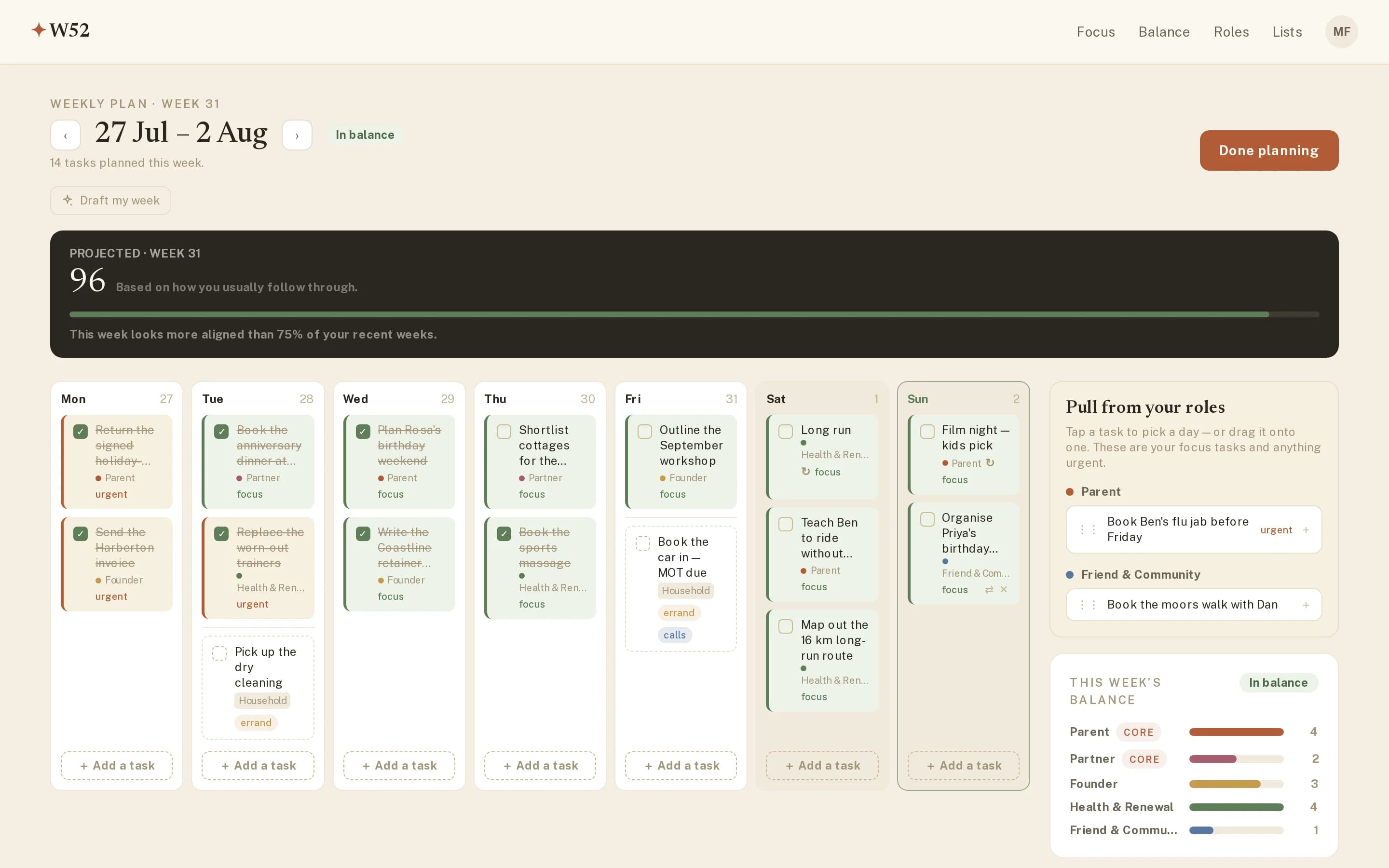
Everything so far — roles, missions, quadrants — exists to make this ten minutes easy. The planner shows a board of your week, Monday to Sunday, and beside it a rail of candidates: the Plan-quadrant tasks from every role, plus anything urgent. Planning is just moving things from the rail onto days — tap a task to give it a day, or drag it onto one.
The shape of a good week
- Every role gets something. Not equal shares — Core roles rightly take more — but no role gets silence twice in a row without you choosing it.
- Days stay believable. Three or four placed tasks is a day that might actually happen. The plan is a promise to yourself; keep it keepable.
- Urgent rides along, it doesn’t drive. Do First tasks land early in the week and get out of the way of the work you chose.
The balance readout
As you place tasks, the panel beside the board keeps a running answer to one question: whose week is this? A bar per role, weighted by importance, plus a projected score based on how you usually follow through. It’s not a target to max — it’s a mirror held up before the week starts, while the plan is still cheap to change.
Times, when they help
Most placed work only needs a day. Some of it genuinely lives at an hour — the 9 am call, the school pickup — so a small clock on any placed task takes a start time and, if you like, an end. Timed items rise to the top of their day in time order; everything else stays happily untimed.
Dated list items join in
Items from your lists that carry a date — the MOT, the dry cleaning — appear on their day alongside the plan, and can be dragged between days like anything else. They sit outside your roles, so they don’t count toward balance; they’re just there so Tuesday tells the truth.
Once you press Done planning, W52 gets out of the way. What you see for the rest of the week is the next chapter: Focus.