Chapter 05
Focus — your week
After the planning comes the living. Focus is the home screen — the week you designed, with today at the top and nothing else asking for attention.
Open W52 on a Wednesday and you don’t see an inbox, a backlog, or a graph. You see today: the two or three things you placed on it, in their role colours, with checkboxes — anything you gave an hour wearing its time. Beneath that, the rest of the week at a glance. That’s the entire day-to-day surface, on purpose — the thinking happened on Monday, so the rest of the week can just be doing.
Today isn’t a cage, though. Arrows on the day card step forward to tomorrow or back through the week — to glance at what Thursday holds, or to tick something you actually did on Tuesday — and Back to today does what it says.
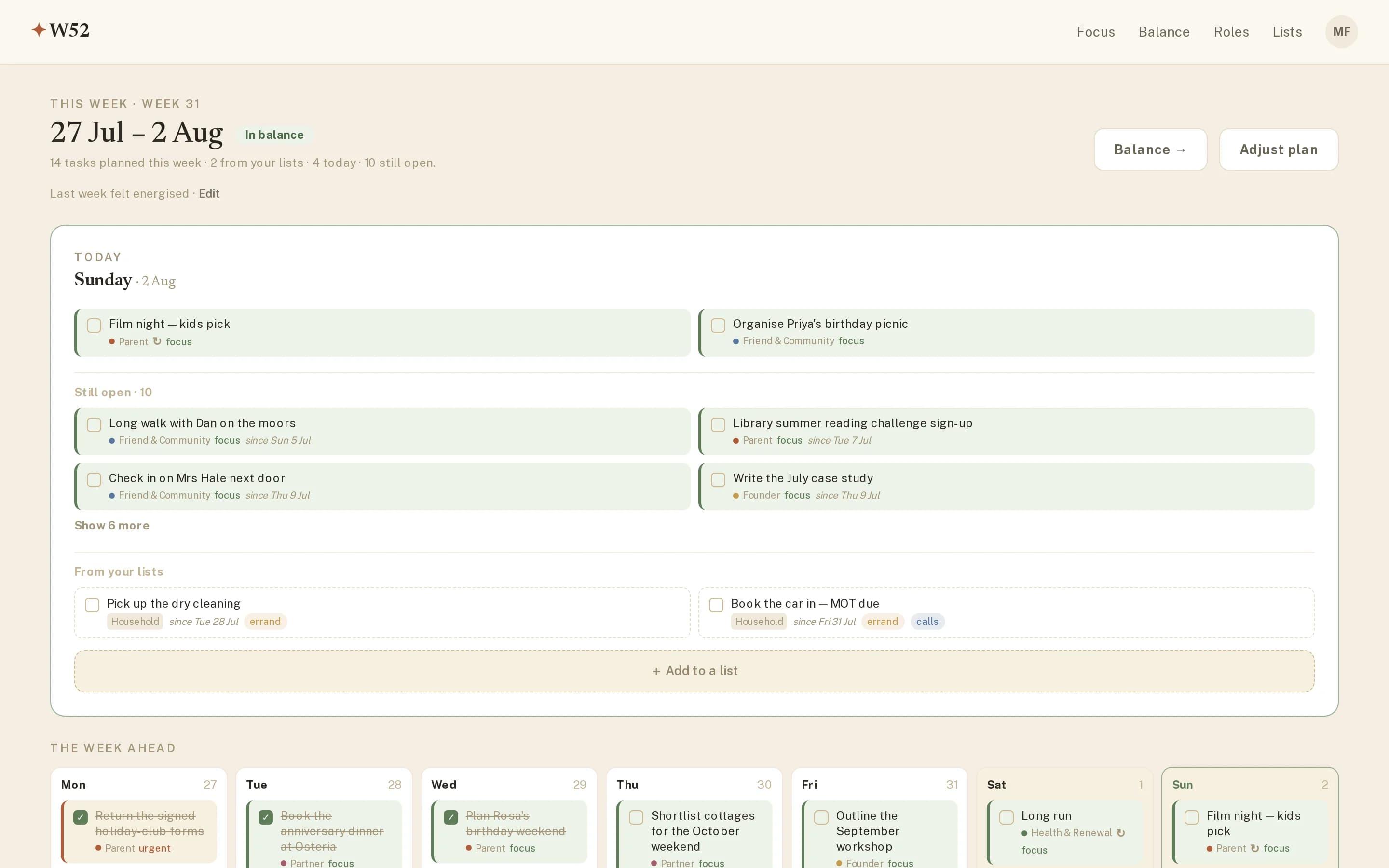
What the screen keeps track of for you
- Still open — planned tasks whose day has passed unticked. They don’t vanish and they don’t shame you; they queue quietly with a note of how long they’ve waited, ready to be done, re-placed or let go.
- From your lists — dated list items for the week, kept visually separate from role work. A quick add at the bottom drops a new one onto a list without leaving the week, on whichever day you’re looking at.
- The week’s pulse — a small “in balance” chip and the count of what’s planned, done, and still to come.
Mid-week honesty
Weeks change: someone gets ill, a client calls, it rains on sports day. Adjust plan reopens the planner at any point — moving a task to Thursday is a decision, and W52 treats it as one, not as a failure. The score cares about follow-through on what you finally chose, not on clairvoyance.
Your week in your calendar
If your days are steered from Google, Apple or Outlook calendar, W52 can meet you there. Turn on the calendar feed in Account and paste the link it gives you into your calendar app: your planned tasks and dated list items appear alongside the rest of life — timed ones at their hour, the rest as all-day entries. The link is private to you; you can get a new one (the old one stops working) or turn the feed off entirely, any time.
Role work isn’t the whole of a life, though. The errands and someday-items need a home that isn’t your week: lists.